AltaVista Forum 98 is a structured storage and management area for office documents, accessible through the Internet with any standard browser. Forum stores documents for universal access by team members or other authorized users, and also permits annotations and discussions around the documents.
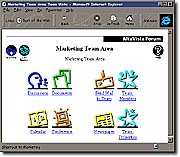 AltaVista Forum 98 allows team members in different locations to quickly create document-sharing processes and discussion forums to match the task at hand. Any member of a team can set up document or discussion
forums or perform routine functions such as adding a member to
the team. A team-specific home page provides links to each
team forum and to critical information about the team and each
of its members.
AltaVista Forum 98 allows team members in different locations to quickly create document-sharing processes and discussion forums to match the task at hand. Any member of a team can set up document or discussion
forums or perform routine functions such as adding a member to
the team. A team-specific home page provides links to each
team forum and to critical information about the team and each
of its members.
Share Documents and Knowledge
The OnSite Library gives you access to the data and
information you need, wherever it is located in your intranet, to
solve your business problems. With AltaVista Forum 98, team
members upload team-specific information to shared Web
servers from anywhere on the network, including LAN servers
or any user's personal computer hard drive, and collate this
information into easy-to-browse shared folders. Over 50
different popular document formats, including rich text Microsoft
Word files, are supported.
Files and folders can be given long descriptive names so that
co-workers can identify them instantly. Information can be
organized by project, individual, action item, data-type, or
whatever make sense to the team. Brief abstracts can be
attached to documents to let others know what each document is
for and what needs to be done with it. Multiple versions of files
can be maintained and easily managed to assure version control.
Files and folders are accessible to team members both inside and
outside your private intranet. This means your team can perform
at its highest level - regardless of each member's geographical
location. Mail notification even alerts team members when new
documents have been posted, based on individual, user-defined
criteria.
Password Protected Access
AltaVista Forum 98 puts your mind
at ease because it provides password protection to limit access
to sensitive or confidential information on intranet or Internet
servers. Read and write privileges can be defined by user, folder,
discussion, or document. Access auditing lets you track access
and modification to any information maintained by AltaVista
Forum.
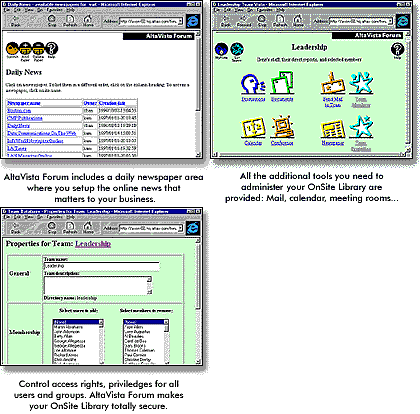 These security features can be applied inside or outside your
Internet firewall. Through its support of open Internet standards
for authenticating Web users, AltaVista Forum 98 supports today's
leading network and firewall utilities.
These security features can be applied inside or outside your
Internet firewall. Through its support of open Internet standards
for authenticating Web users, AltaVista Forum 98 supports today's
leading network and firewall utilities.
AltaVista Forum 98 also includes a number of features to allow commenting and discussions on your documents:
Post-and-Reply Conferencing
While many organizations take advantage of Web technologies
to broadcast information within their organization, this
information flow is largely unidirectional. AltaVista Forum 98 allows
members to interact from any location.
Users can initiate team discussions or add comments to topics
and messages posted by others; multiple levels of reply are
supported. AltaVista Forum 98's automatic "posted-by" feature
stamps the message or reply with the identity of its originator,
and the data and time. Users can upload files, like spreadsheets,
graphics, or text documents - or supply hotlinks to integrate this
information into discussions.
When topics or files are posted, submitters are asked to enter an
abstract describing content, categorize the information as
desired, and provide keywords. This enables the AltaVista
Search facility to organize discussions by subject, keywords, or
contents using high-performance, automatic threading.
Make Each Opinion Count
AltaVista Forum 98 comes with a built-in polling capability,
allowing team members to register opinions. Polling results are
managed in real time and displayed graphically in a bar chart.
This important polling capability enables members of busy and
geographically dispersed teams to conveniently establish
consensus on key issues in a convenient, time-shifted manner -
without a lot of inefficient, time-consuming meetings.
Chat Features Built-in
For time-sensitive team collaboration, AltaVista Forum 98 supports
easy-to-use, real-time IRC text chatting. On-line chatroom
support is offered by Digital partner Web Master on Web
servers running Digital UNIX. AltaVista Forum 98 is based on
standard Internet protocols, so you can hold real-time
conferences from your local network or from halfway around
the world.
The powerful AltaVista Forum 98 search engine - the same
one used in Digital's AltaVista Internet search site - lets team
members find needles in the haystack -- in seconds.
On-Line Calendars Pull the Plug on Telephone Tag
Calendar and meeting-management functions built into AltaVista
Forum allow team members to schedule and set up
conferences on-line, greatly reducing inefficient phone tag. Team
members can also maintain individual calendars with private and
public - shared - areas, allowing flexible integration with team
and community calendars.
Put the Latest News at the Team's Fingertips
AltaVista Forum 98 lets team members keep their eye on the select issues, using
sophisticated filters to deliver only data, articles, news briefs of
real value to the team. This saves hours of time managing
distribution lists and browsing through irrelevant and extraneous
information and keeps everyone up on latest developments in the
field.
AltaVista Forum 98 accepts news feeds from Individual, Inc.
and Associated Press. Team members can use advanced
AltaVista information filtering technology to cull key data from
e-mail messages, text files, and HTML sources, too. Topics of
interest can be selected by their value to the team or to suit
individual tastes. Team members can submit articles to public
newsgroups, and post articles derived from these sources to
team discussion and document forums.
Use Windows NT, UNIX and Standard browsers.
AltaVista Forum 98 can be installed on any Digital UNIX, Windows NT, or Sun Solaris (Sparc) HTTP TCP/IP server as an application running under popular Web server software such as Netscape, Process Software, and NCSA. A single Windows NT or UNIX server can easily handle medium- and even large teams.
Team members access AltaVista Forum 98 from their Windows
PC, Macintosh, or UNIX workstation using Web browsers
Netscape Navigator and Microsoft Internet Explorer. This
eliminates expensive per-desktop startup costs and, best of all,
you can get AltaVista Forum 98 up and running in minutes.
Robust Development Environment
Create your own collaboration forums or customize ours. The Windows NT-based development environment provides a friendly workbench. Based on the powerful and open Tcl language, AltaVista Forum 98 can be extended with custom scripts, shared images and DLLs - even Java applets.
AltaVista Forum 98's Software Developer's Kit (SDK) also
provides out-of-the-box template applications that can be used
as building blocks.















 AltaVista Forum 98:


