  |
||||||||||||||||||||||||||||||||||||||||||||||||||||||||||||||||||||||||||||||||||||
                 Search eXtensions 97FamilySearch your IntranetSearch your PCWhat can I do with them?Find your SolutionTry it FREE Search eXtensions 97FamilySearch your IntranetSearch your PCWhat can I do with them?Find your SolutionTry it FREE   |

|
This report focuses on how AltaVista Search Intranet eXtension 97 compares to competitive offerings, including Excite™, Microsoft Index Server™, OpenText™, and Verity™.
This report:
AltaVista Search Strengths
Scalability, Scalability, Scalability
Concurrent Users multiplied by Indexed Web Pages <= 70,000,000.
(For example, one AltaVista Search Intranet eXtension 97 server can index 700,000 Web pages for searching for 100 users simultaneously.)
One AltaVista Search Intranet eXtension 97 server is currently indexing over 1,600 internal Web servers and a few external Web servers, including Digital's primary commercial Web server. It is servicing queries from approximately 60,000 people. This is an Alpha server running Digital UNIX.
The "Crawler" is the software that travels through all the servers to be searched and indexes their contents. When you initiate a search query, it is this index that is searched, which is why all AltaVista Search and its extensions can be so incredibly fast.
Honors robots.txt - Web servers that use the Robot Exclusionary Standard can prevent AltaVista Search from crawling the entire server or portions of the server.
Easily pointed to specific Web servers - AltaVista Search Intranet Private eXtension 97's crawler is controlled via a Web browser interface. The AltaVista Search administrator can send out AltaVista Search crawlers to specific domains, sub-domains, TCP/IP server address, etc. The administrator can also tell the crawlers to avoid specific Web servers or portions of a specific Web server.
Crawler licensing is open ended – With AltaVista Search, the crawler is included. It is not an extra cost option and it is not limited to a specific number of Web sites. Verity's crawler is an extra cost option, and the more sites you crawl, the more money you pay.
Supports constant crawling - AltaVista Search's indexing engine can take constant input from the AltaVista Search crawler. The index is constantly updated in real time. This means you can make sure that your search site is always up-to-date.
Traverses directory trees – This is another new feature of AltaVista Search Intranet eXtension 97. The search administrator points AltaVista Search to a file directory via a URL. AltaVista Search Intranet eXtension 97 will index all the files within that directory, along with files located in sub-directories. You no longer need to create Web pages with hyperlinks to individual files. Indexing Features and Benefits
Fast indexing - On an Alpha CPU, AltaVista Search indexes new material at 1Gigabyte per hour!Querying Features and Benefits
AltaVista Search Intranet eXtension 97 features extremely efficient query lookups - An X million word index can handle Y queries per second using only X*Y/150 MIPS. Here are some of its notable capabilities.
Simple user interface - Users just type or paste a list of words into the query window. AltaVista Search's collection-frequency weighting software automatically ranks the results. Users do not need to worry about any complex commands or syntax.
Advanced user interface - If you have precise querying criteria, you can control returns by using:
Phrase searches - AltaVista Search's word-for-word index provides excellent phrase searching. This is called into play by enclosing the phrase in quotation marks. This capability can be combined with all the other querying features.
Proximity searches - This query technique allows you to look for documents that contain words that are used close to one another.
Field searches - AltaVista Search allows users to look for specific URLs, titles, and links.
Precise and imprecise matching on accented characters - This means users who are not well versed in a foreign language do not need to be concerned with getting accented characters right in their queries.
Case sensitive and case insensitive queries - You decide whether your query should return hits on pages with words in the "correct" case.
Duplicate Web pages are not returned - AltaVista Search does not waste your time with duplicated information.
AltaVista Search is predictable - Users are always told how many hits their query returned. They are also told how frequently their query was found in the overall index.
Advanced Search page users use Boolean, specific Results Ranking Criteria, Start Date and End Date instructions to control returns. This allows experienced search-and-retrieval users control the returns delivered by AltaVista Search. Researchers and librarians often prefer AltaVista Search's Advance Search page.
Most users usually get the best results by using Simple Search and letting AltaVista Search's collection frequency rating software control the query.
"Robots.txt" Compliance
Robots.txt is an ASCII file placed in the Web server's root directory that tells Web crawlers whether or not they are invited into the Web server's Web site. Robots.txt can forbid entry to crawlers. It can also direct crawler activity to specific sections of the Web site.
Unfortunately, not all search engines honor the Robot Exclusion Standard. Verity based crawlers for example can be told to ignore Robot.txt instructions forbidding entry onto a Web site. Aside from being ethically questionable, this can have dire consequences for the server getting returns from the errant crawler. Some Webmasters routinely send a few thousand large e-mail messages to the server that sent out the crawler that ignored their Robot.txt instructions. This issue may not be important to Intranet Web server situations, because the company can set internal policies to control which Web servers are crawled.
AltaVista Search always honors Robot.txt instructions. Webmasters, Web consultants and Web magazines say AltaVista Search uses a well mannered, polite crawler.
Database Integration
The AltaVista Search Developer's Kit 97 is available for Windows NT and Digital UNIX developers. It is a toolkit that enables system integrators and developers to integrate AltaVista Search with structured and non-structured databases. AltaVista Search Developer's Kit (SDK) 97 search-and-retrieval solutions are extremely fast, efficient and scaleable. Features and capabilities include:
AltaVista Search's index contains information that describes the structure / organization of the documents in the index. HTML files use meta data tags to describe the documents structure. AltaVista Search uses the meta data tags when users perform fielded queries. Examples of fielded queries include searching for titles, URLs, and links.
AltaVista Search Intranet eXtension 97 also allows users to perform Boolean logic and wild card queries. This makes it easy for users to easily expand and control their queries. For example, searching for Baltimore AND hotel and using the word hotel in the relevance ranking dialog box will put 10 very useful hyperlinks to specific hotels in Baltimore, MD at the top of the returns list.
Stemming converts words to their root and the search is done on the root and all derivatives of the root. For example, if you are searching for the word "systemic", stemming search engines would recognize that its root is "system" and then it would search for all words that have system as the root.
This means you would receive returns on: system, systematic, systematical, systematically, systematics, systematism, systematist, systematization, systematize, systematized, systematizer, systematizes, systematizing, systemic, systemically, systemization, systemize, systemized, systemizer, systemizes, and systemizing.
Stemming causes lots of false hits because it automatically looks for too many options. On the other hand, it also makes it very easy to find closely related words.
Excite, the Microsoft Index Server, Verity and OpenText all utilize stemming.
Thesaurus Techniques
This is another language-dependent technique designed to automatically expand the user's search criteria. For example, if you are searching for the word hat, a thesaurus-based search engine might expand your query to include: cap, bonnet, sunbonnet, and hood. This can be a useful technique when you need to expand your search and you are not well versed on your topic. It can also result in false hits when the user is looking for a particular word or phrase.
Verity and OpenText utilize thesaurus techniques.
Morphological Analysis
Morphological analysis is another common querying technique used by older search engines and some of the new Web-based search engines.
Sentences and words are parsed to determine their meaning / purpose / structure. This process is language dependent. Every language you need to work with requires extra software.
Concept Techniques
This technique is also known as "words commonly seen together." This technology requires a relatively large set of Web documents to provide good returns. Excite uses this technology, and anecdotal feedback says few intranets currently contain enough textual data to give consistently accurate returns.
Excite continually refers to their use of concept techniques as a major plus point. However, here is the rest of the story. The Excite software does not index the entire Web page. Instead, they only index the "remarkable" words.
Acronyms with periods are a problem for many concept-based search engines.
Concept engines do not handle phrase searches. For example, try searching for "to be or not to be" on Excite's World Wide Web site. You will get few if any returns because prepositions are not "remarkable" words. (By the way, AltaVista Search found over 2,000 documents with the phrase "to be or not to be" on the World Wide Web at the time of this writing.)
Suffix Trees
Suffix trees allow users to search for parts of a word or a phrase just as easily as they can search for a single word.
Suffix trees also have some serious disadvantages. The database / index is usually as big as the original text. They also need to have the original text online. This means the overall database is twice as big as the information repository being indexed. Constructing the suffix tree oriented index is a much slower process than constructing an inverted index based on words. Performance often suffers while the index is being updated. AltaVista Search's inverted word index does not have these problems.
To sum this up, most users are not looking for parts of a word when they do a query. Most users also feel that phrases, single words and wild cards provide plenty of querying flexibility. The ability to look for a piece of a word is a minor advantage when compared to the major disadvantages around index size and indexing speed.
What they don’t reveal are the limitations of the indexing technologies that lie behind their user interfaces. Our competitors don’t mention scalability, indexing efficiency, index completeness, query response time and language independence features, because AltaVista Search is the clear winner in those categories, the most important measurement criteria.
Weak Points
Competitive products do not scale well. For example, Microsoft Index Server, Excite, and Verity based solutions are often sold as Internet appliances. You must keep adding new search servers as your user community and information repositories increase. Then, you daisychain your queries from search server to search server. This means longer response times. You also get to buy, install, and maintain more search servers.
Open Text and other search engines that rely on suffix trees can handle large indexes, but performance and disk space requirements are often major issues.
Concept-based search engines such as Excite do not index every word on a Web page, and they throw many words away. They also need a large Web site to consistently return accurate query results.
Verity and OpenText crawlers are not as efficient as the AltaVista Search crawler. We find data faster.
Their indexes are not as efficient. AltaVista Search's index is smaller and more efficient than any of our competitors.
Their query engines are often language dependent. Adding additional languages means additional money.
**** * * * * **** ** Not available ** * **** ** ** * * **** * ** ** ** *** ** ** ** ** *** ** ** ** ** ** *** *** *** *** ** *** ** ** ** ** * * ** ** * * * **** *** *** *** * ** *** 32 21 17 23 22
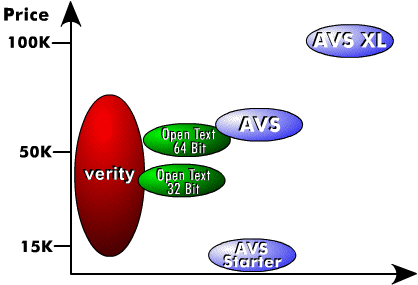
Pricing
OpenText sells two versions of the same product. Their 64 bit version costs more than their 32 bit version. OpenText is no longer competing for search-and-retrieval business. They are concentrating on document management and business process reengineering sales. AltaVista Search Intranet eXtension 97
The best World Wide Web search engine is now available for private information. Covers Web- and LAN-server information repositories. Indexes over 200 file formats. The crawler is included at no extra cost. Optional database integration software is available. It is very scalable.Excite Vs. AltaVista Search Intranet eXtension 97
Excite doesn't index Office documents. It only supports HTML and text. It doesn't handle databases or PC application files. Its concept and relevance ranking software needs a large Intranet to give accurate query results. It only indexes remarkable words. This keeps the index size down, but it means exact phrase search is not possible.Microsoft Index Server Vs. AltaVista Search Intranet eXtension 97
This is a single-server application. It does not crawl its way through an intranet. It only indexes files within sub-directories on a single NT server. If your Web pages are located on multiple Web servers, this solution will not work well in your environment. If your Web pages contain hyperlinks to Web pages residing on other Web servers, the Microsoft Index Server will not be able to index all your material.OpenText Vs. AltaVista Search Intranet eXtension 97
OpenText is no longer concentrating on the search-and-retrieval business. They now see document management and business process reengineering as their business. OpenText indexes are very, very large. Users say it is easy to have an index that is twice as big as the data being indexed. OpenText software is expensive for what you receive.Verity Vs. AltaVista Search Intranet eXtension 97
The systems overall design is very language dependent. |
||||||||||||||||||||||||||||||||||||||||||||||||||||||||||||||||||||||||||||||||||
| |||||||||||||


