












Sleep at Night with the AltaVista Firewall
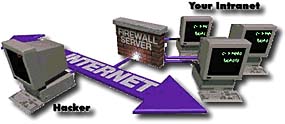
A firewall is a computer that monitors what comes into the network from the outside. This computer uses
special firewall software to scan the information packets and allow only authorized users into the internal
network. This protects the network from unwanted visitors and dangerous files from being passed through the
firewall.
| AltaVista Firewall 97 |
Price (US$) |
| For 25 nodes |
$2,495 |
| For 50 nodes |
$3,995 |
| For 200 nodes |
$7,995 |
| For an unlimited number of nodes |
$14,995 |
|
|

|
AltaVista Firewall 97:
The Active Firewall
The best - and the only one that’s always in motion in your defense.
Only the widely respected AltaVista Firewall 97 is quick and nimble enough to be called the Active Firewall. It’s the only one that independently reacts to network violations while alerting you via pager, e-mail, or audio alarm, and even shutting down the firewall against heavy attacks. AltaVista Firewall 97 knows all the tricks - and it's the highest level of protection for your network.
AltaVista Firewall 97 for Windows NT provides a flexible and secure connection between your private network and the Internet, or other insecure public TCP/IP networks. It prevents unauthorized access to your private network, while providing controlled access to Internet services to users within your network.
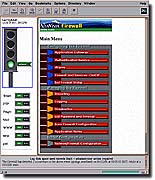 AltaVista Firewall 97 "shines in ease of management," according to DataComm (3/21/97). "It is the easiest firewall to control and configure," NetworkWorld said (2/3/97). AltaVista Firewall 97 also leads in advanced management features with the best reporting and alarming, as befits its pride as the Active Firewall.
AltaVista Firewall 97 is the only one that takes an active role in your security management. With its unique intelligence, it warns you of impending danger of intrusions, is constantly looking for threats to your defined security zone, and takes evasive action when attacks do occur.
AltaVista Firewall 97 combines trusted application gateways, comprehensive logging, reporting, real-time alarms, strong authentication, graphical user interface (GUI), and a step-by-step installation wizard all in one software package. AltaVista is by far the fastest firewall available, with no compromise on security. This demonstrates not only its high efficiency, but the tightness of its Windows NT integration.
Trusted application gateways to allow users access to most common services on the Internet, including file transfer (FTP), remote sessions (Telnet), World Wide Web, Mail, News, SQL*Net, RealAudio and finger. Can be configured to allow controlled access from the internal network to the public network, and also from the public network into the internal network.
Customizable generic TCP application gateway, which provides secure connections to services that do not use a dedicated application gateway.
Secure Sockets Library (SSL) support included with the World Wide Web proxy.
Security that is enforced at several levels. IP forwarding is disabled and continuously monitored by the firewall alarm system. All access through the firewall must be through the trusted application gateways. A system on one side of the firewall cannot access another system on the same side of the firewall via the firewall.
Strong authentication support, using one-time passwords. FTP and Telnet gateways can be configured to allow access only to authenticated users through NT domain login or with hand held authenticators. The hardware authentication cards such as SecureID cards from Security Dynamics must be purchased separately.
Comprehensive logging of all events relating to the operation of the firewall.
Reports, which give a summary of the usage of the firewall and of individual services. The reports can be viewed through the user interface, mailed automatically to a specified distribution list at regular intervals, or both. All reports use information from the system log files. A wide range of summary reports and detailed reports are available.
Active architecture which can take actions on behalf of the system administrator with a sophisticated alarming and notification system.
Automatic alarms that alert the system administrator to unusual or potentially threatening events relating to the firewall. The alarm system continually monitors the firewall system in real time for any events that are unusual or suspicious. Standard alarm actions include sending mail to the system administrator, raising the security status of the firewall, triggering a custom script and shutting down individual services or the whole firewall.
Remote management allows system administrators to perform the following operations remotely: - View/Change firewall status
- View firewall activity
- View firewall event messages
- Stop/Start firewall services
Installation wizard for easy step-by-step firewall installation, including DNS configuration.
Comprehensive graphical user interface through which all configuration administration, and management tasks are performed.
Automatic shutdown of individual services or the whole firewall if the firewall is under continued or repeated attack. AltaVista Firewall for Windows NT can automatically shut down the service or the whole firewall to prevent the firewall from being compromised.
AltaVista Firewall software can be used with the AltaVista Tunnel product to create a virtual private network over the Internet and allow encryption and authentication securely through the AltaVista Firewall. Both products can run securely on the same system with a packet filter application provided with the firewall.
The product supports Remote Access Service (RAS) on NT for external connection. This feature is used most often in an environment where Internet connection is via a dial-up line.
HARDWARE REQUIREMENTS
Any Alpha or Intel processor running Windows NT - System must include a monitor, support two network interface cards or adapters - CD-ROM reader.Note: SQL*Net proxy does not run on Alpha platforms running Windows NT - Disk space required for installation:11 MB - Disk space required for use: 2 GB - 48 MB of memory, 64 MB of memory is recommended - Windows NT Version 3.51 or 4.0 Workstation or Server (Windows NT V4.0 or later required for remote management).
|




